Requires on-ground staff’s manpower and manhour to manually change every single screen
Costly
Unnecessary manhour costs to change content
Lack of Automation
As content has to be uploaded and changed manually every time, there is a lack of automation
What If ?
More than 100 screens require content to be changed simultaneously?
Faster or more reliable way to manage content?
Ability to identify which screen went down?
Possibility to track data?
City Screen SIGNHUB – Cloud Based CMS
Efficiency & Flexibility
Manage/change/upload content virtually as long as there are internet connection
Automation & Tracking
Content can be automated based on number of content, when to playback based on daypart and time belting
Reliability & Security
Data are tracked and stored in cloud for up to 7 years in secured servers
Cost Savings
On-site server are not required when
Traditional Method of Changing Content USB Thumb Drive
Bigger Challenges What If?
Solution to Challenges City Screen SIGNHUB – Cloud Based CMS
USB Thumb Drive
Inefficient
Requires on-ground staff’s manpower and manhour to manually change every single screen
Costly
Unnecessary manhour costs to change content
Lack of Automation
As content has to be uploaded and changed manually every time, there is a lack of automation
What If ?
More than 100 screens require content to be changed simultaneously?
Faster or more reliable way to manage content?
Ability to identify which screen went down?
Possibility to track data?
City Screen SIGNHUB – Cloud Based CMS
Efficiency & Flexibility
Manage/change/upload content virtually as long as there are internet connection
Automation & Tracking
Content can be automated based on number of content, when to playback based on daypart and time belting
Reliability & Security
Data are tracked and stored in cloud for up to 7 years in secured servers
Cost Savings
On-site server are not required when
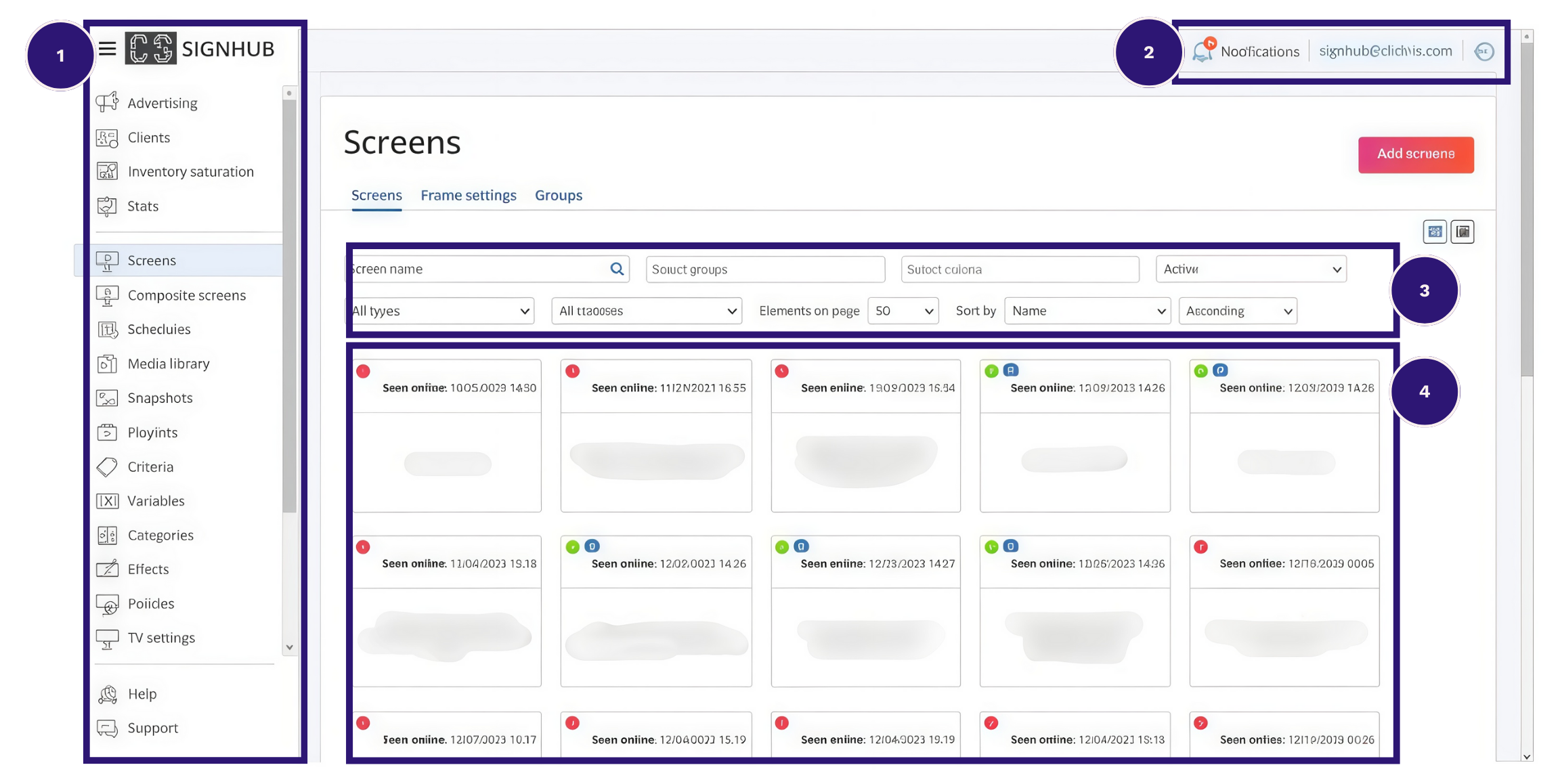
UI/UX
User Friendly Interface That Is Easy To Navigate
1
Menu Navigating Interface
Seamless and easy access to navigate to the required page.
2
Notifications & Login Credentials
3
Filter Function to source for screens
Filter screen by: Name / Groups / Criteria / Status / Type
4
Status of Screens
Screen’s Status – Offline/Online & Last Seen
Ability to change content by clicking into specific screen
1
Menu Navigating Interface
Seamless and easy access to navigate to the required page.
2
Notifications & Login Credentials
3
Filter Function to source for screens
Filter screen by: Name / Groups / Criteria / Status / Type
4
Status of Screens
Screen’s Status – Offline/Online & Last Seen
Ability to change content by clicking into specific screen
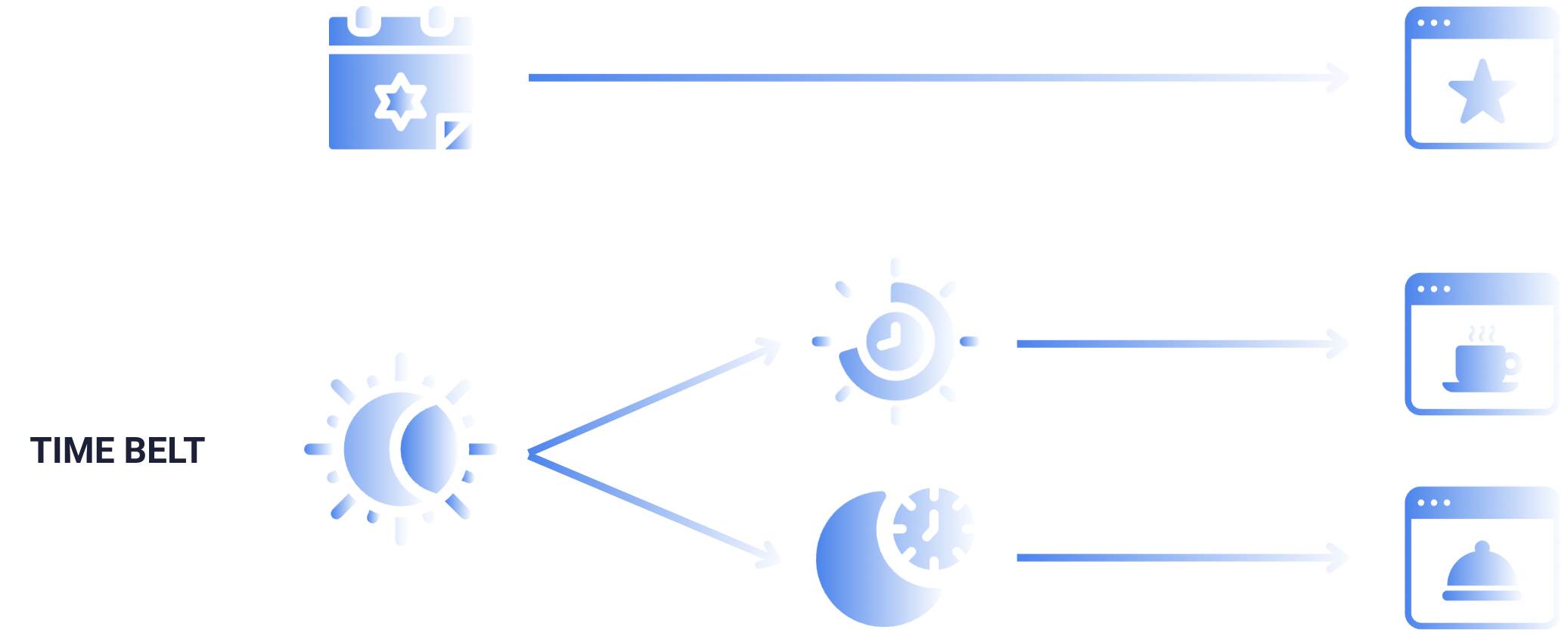
Ability To Do Day Parting And Time Belting
Day Parting & Time Belting
A unique feature adopted from the premise of Out-of-Home advertising are the abilities to do day parting & time belting.
Displaying specific content at a designated date and designated time – all automated.
Composite Screen
Synchronisation Of All Screen
Screen Synchronization
Composite screen offers two functions:
01
Content change and synchronize at the same time across different screens.
02
Ability to create immersive visuals across multiple screens.
Similar Content
Synchronization of screen with same content across multiple screens.
Synchronized Content
Synchronization of screen with different content across multiple screen.
Composite screen feature allows for integration of multiple screens and run the synchronized content.
This can create a spectacular visual of synchronization of screen during an event/promotion to show the same content on multiple screens of different locations OR create spectacular visual effects – e.g. objects flying from one screen to another.
Split Screen Feature
CITY SCREEN offers the ability to split a single screen into multiple frames offered in-software.
Each frame gives clients the opportunity to run different content. In certain scenarios, be able to commercialize certain spaces too.
Example: A single screen can be split into any ratio into frames to run different content.
70%
Branding / Directory
30%
Product Feature
Screen Grouping By Location Or Store-type
For clients with many screens distributed across different stores/retail, we can do detailed targeting and playback of content depending on the location.
Penang – Chinese Content
Example:
Penang screens that are targeting Chinese audience – will play Chinese language content to target Chinese.
Target Screens Down to Coordinates
Example: 3.1319° N, 101.6313° E
In a more complex scenario, where a location target multiple audience, each individual screen can play and targeted at its unique content.
Kelantan – Malay Content
Example:
Kelantan screens that are targeting Malay audience – will play Bahasa language content to target Malay audiences.
Integration With External Systems That Is Driven By Data
CITY SCREEN also can integrate with external systems, such as Point-of-Sale Systems, Hospital Information Systems, Queue Systems and more!
There are multiple ways to execute this, but the best thing is, all the data are tracked for marketer’s utilization!